Yolo Devlog 01: Start Recording from Today
Yolo is a time tracking tool I’ve been building.
It’s not a todo list. Todo lists capture intentions — “here’s what I plan to do.” Yolo captures facts — “here’s where my time actually went.”
So the core isn’t checking boxes. It’s the relationship between tasks and time: create a task, start it, pause it, stop it, and along the way leave notes, blockers, next actions, and completion percentages. At the end of the day, I don’t get a pretty but potentially dishonest list of checkmarks. I get a timeline of what really happened.
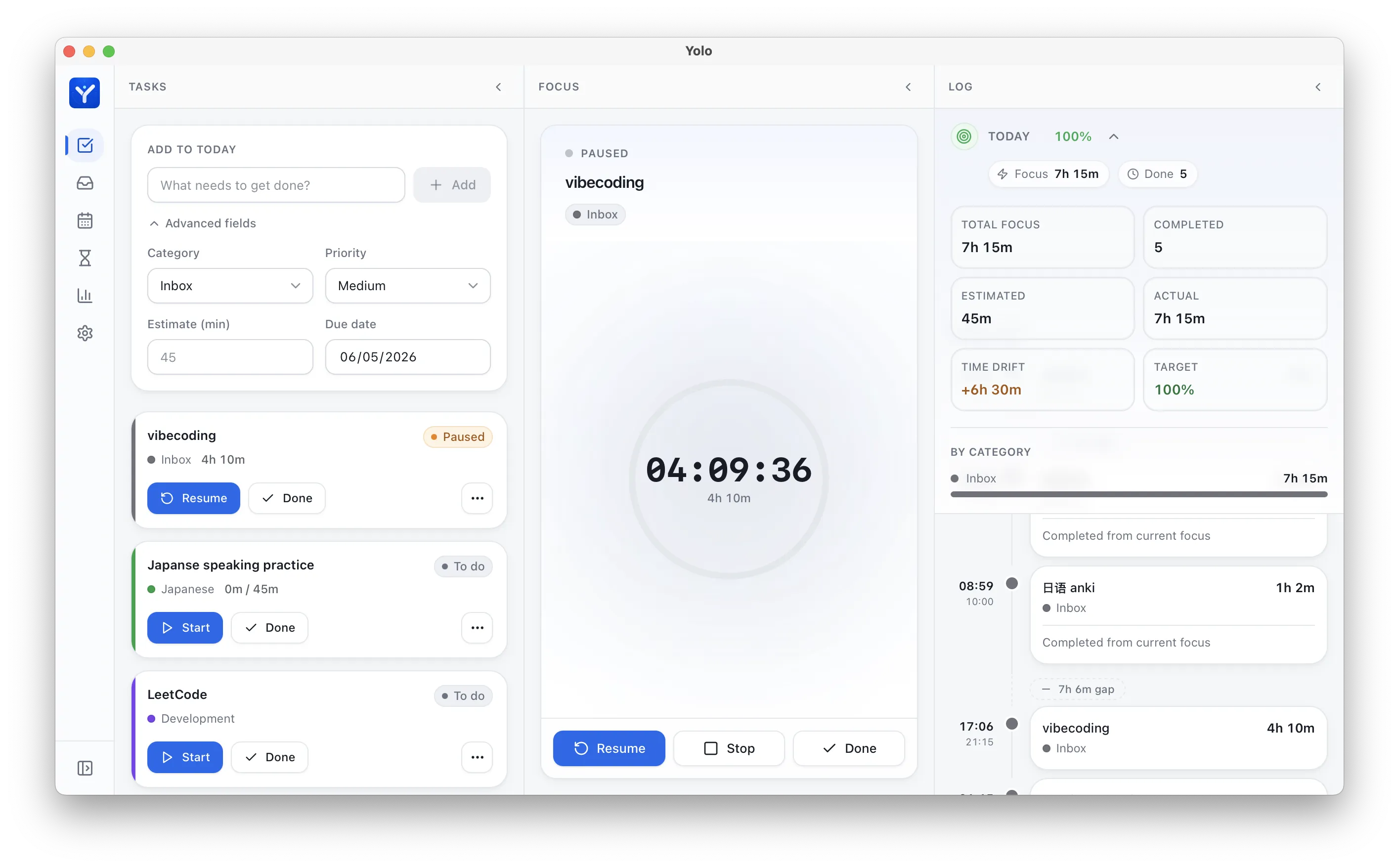
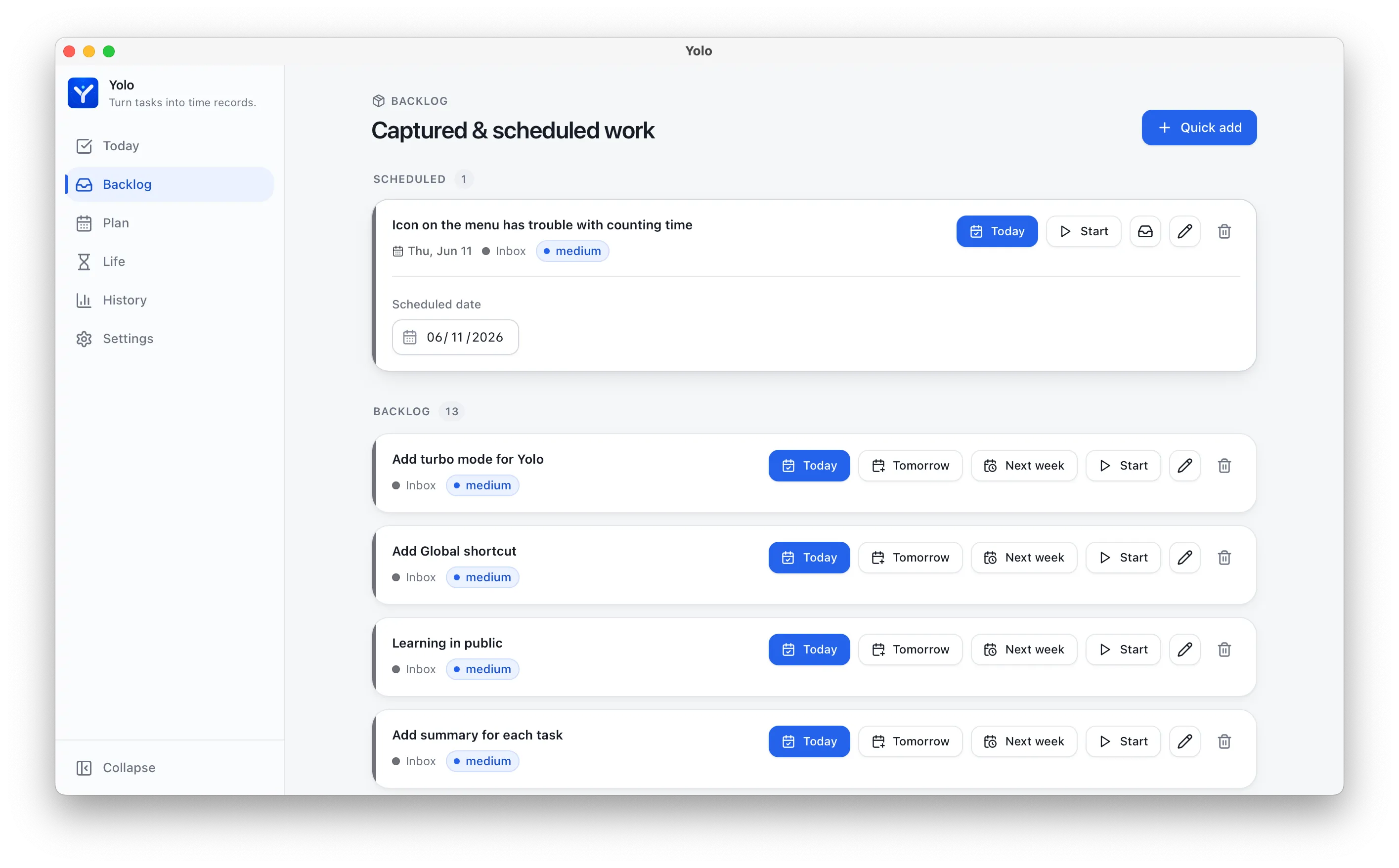
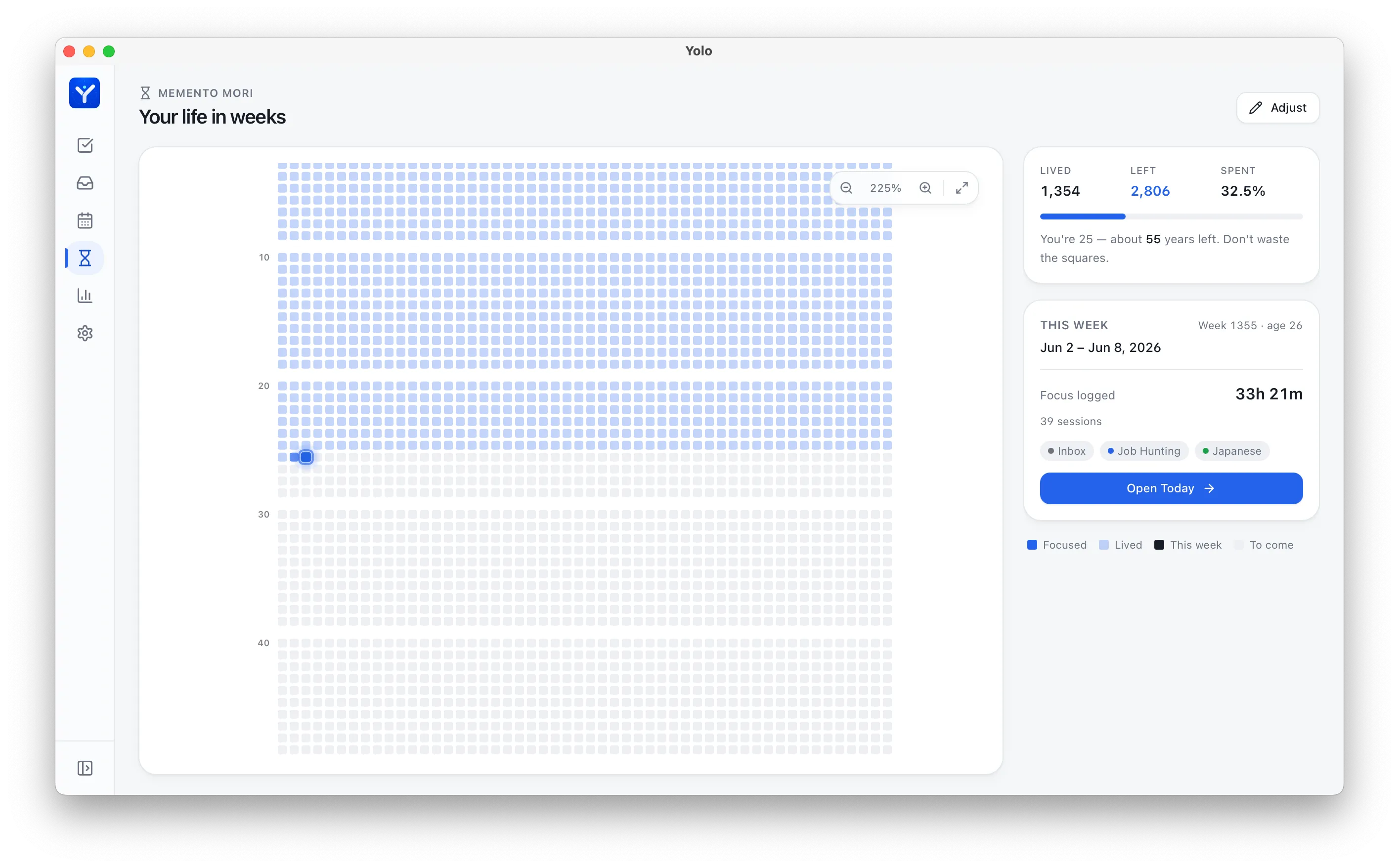
Right now Yolo is a Tauri desktop app — React + TypeScript for the UI, SQLite on disk. It’s got a Today page, a Focus area, a Timeline, a Backlog, a planning system, and a Life view. The direction I’m aiming for: first, make it a time ledger I actually reach for every day. Then, gradually grow AI-native capabilities on top.
This is Yolo’s first devlog.
Strictly speaking, Yolo didn’t start today. The desktop shell, task system, timers, Today page, planning, logging, Life view, and the MCP server skeleton were all already in place.
So “day one” here doesn’t mean the project started from zero. It means that starting today, I want to seriously document how it grows.
The earlier phase was more like speed-running a usable prototype: add features whenever they came to mind, fix bugs as they appeared, refactor whenever the UI felt off. That flow state is addictive, but when I look back, all that’s left are commits and code. I can barely remember why a certain design choice was made, or how a feature really came together.
So — from today, I’m recording.
This isn’t a retrospective. It’s a starting snapshot: what Yolo looks like right now, why I’m building things in this order, and where I’m planning to push next toward AI-native.
Where Things Stand
Here’s what Yolo has today:
- Tauri + React + TypeScript desktop app
- Local SQLite database
- Task and category system
- Full task lifecycle: start / pause / resume / stop / complete / drop
- Today page for planning and logging the day
- Focus area showing the currently active task
- Today Log / Timeline to review what actually happened
- Backlog and scheduling
- Life view that zooms out to a calendar of your weeks
- A read-only MCP server so AI can read tasks and time entries
It’s a working skeleton, but it’s not the final form.
Right now, Yolo is a minimal viable time recording system. It captures what you actually did in a day, instead of leaving you with a vague feeling:
“I was pretty busy today, I think.”
The reason I built Yolo is simple:
I want to know where my time actually goes.
Todo lists record intentions.
But most of the time, what matters is what you actually did.
Those two things diverge more than you’d think. In my plan for the day, I’ll write: study Japanese for an hour, code for two hours, read for thirty minutes. Sounds reasonable. But by the end of the day, maybe I just bounced between tasks — a little bit of each, nothing deep. Sometimes I think I studied all morning, but when I actually track it, the focused time turns out to be an hour or two at best. The rest got silently eaten by micro-distractions and context switches.
Yolo is here for the latter.
Not intentions. Facts.
Why I Didn’t Lead With AI
I didn’t start by building an AI-native app. I didn’t draw up some grand AI-powered time management architecture first, either.
The reason is simple: I wanted to build something I’d actually open and use every day.
Something concrete. A ticking clock, today’s tasks, daily stats, a timeline.
If all I wanted was an AI time management assistant, I could stitch together Hermes Agent + Google Calendar + Obsidian and call it a workflow. But I want a real product — a desktop app I use daily for logging, reviewing, and feeling the friction firsthand.
Friction only surfaces when you actually use the thing.
Take the notes, blockers, next actions, and completion percentages I log when stopping a task. At first, they’re just text. But once there’s enough of them, they naturally become something an AI can help with:
- Where did I get stuck today?
- Which tasks do I consistently underestimate?
- What should I prioritize tomorrow?
Same goes for daily summaries.
Without real time entries, the AI only has my verbal report: “I feel like I did a lot today.” But human memory of a day is notoriously unreliable.
Data is at least a little more objective.
SQLite won’t tell me what I want to hear, and I like that about it.
So the MCP server wasn’t a feature I bolted on for AI hype. It was a natural next step. Yolo already had tasks, categories, time entries, and actual daily execution data. AI should be able to read that data directly — not rely on me paraphrasing it from memory.
Putting AI in the Right Places
My thinking on Yolo’s AI direction is getting clearer:
AI shouldn’t be a standalone entry point. It should be embedded into the workflows where it actually reduces friction.
Things like:
- Generate a daily debrief from real time entries at the end of each day
- Plan tomorrow based on the backlog, due dates, and available time
- Spot tasks that consistently run over and calibrate estimates
- Summarize blockers and next actions from stop notes
- Parse natural language into structured tasks on creation
- Flag gaps between plan and execution during reviews
All of these have one prerequisite: Yolo needs to be a good tool on its own first.
- Without a foundation of real data, AI is just guessing.
- If the core workflow is clunky, AI just becomes a band-aid.
But when the base tool already captures a day smoothly, AI becomes a natural enhancement layer — not a crutch.
That’s the version of AI-native I’m after.
- Not “this app has AI features.”
- But “this app’s data and workflows are naturally legible to AI, and AI makes them better.”
Start Recording from Today
This postmarks a boundary for me.
Before today, I was building Yolo.
Starting today, I want to document how it grows.
I’m not going to package this project as something that was perfectly planned from day one. The truth is, it’s taking shape as I use it:
- Build a time tracking tool I’ll actually use daily.
- Notice the repetitive actions through real use.
- Automate the repetition.
- Then bring in AI to help with summaries, planning, and calibration — grounded in real data.
This process feels more solid than drawing up a massive architecture diagram upfront.
It also lines up with how I approach building tools now:
Don’t over-plan. Just make yourself use it.
When you actually use it, problems surface on their own.
Once they surface, then decide: automate this? Connect AI to it?
Yolo is still early.
But I want to seriously document it becoming itself, step by step.
If it eventually becomes an AI-native time recording system, I want to look back and see that it didn’t become that overnight.
It started from a very simple question:
Where did my time actually go today?
Today’s Work: MCP Integration
The key step today was actually wiring Yolo’s MCP capabilities into Hermes.
Yolo already had an MCP server skeleton in the codebase — visible, buildable — but it wasn’t yet something my daily AI assistant could call directly.
Today I closed that gap.
The MCP server is read-only for now, exposing these capabilities:
list_tasks— list tasksget_task— view a task and its time entrieslist_time_entries— list time entries for a day or time rangedaily_summary— generate daily time statslist_categories— list categories
With this hooked up, Hermes can read Yolo’s local SQLite data directly through MCP. I no longer have to manually describe “what I did today.”
This matters.
It means Yolo is starting to go from a simple time tracker to a time recording system that AI can understand.
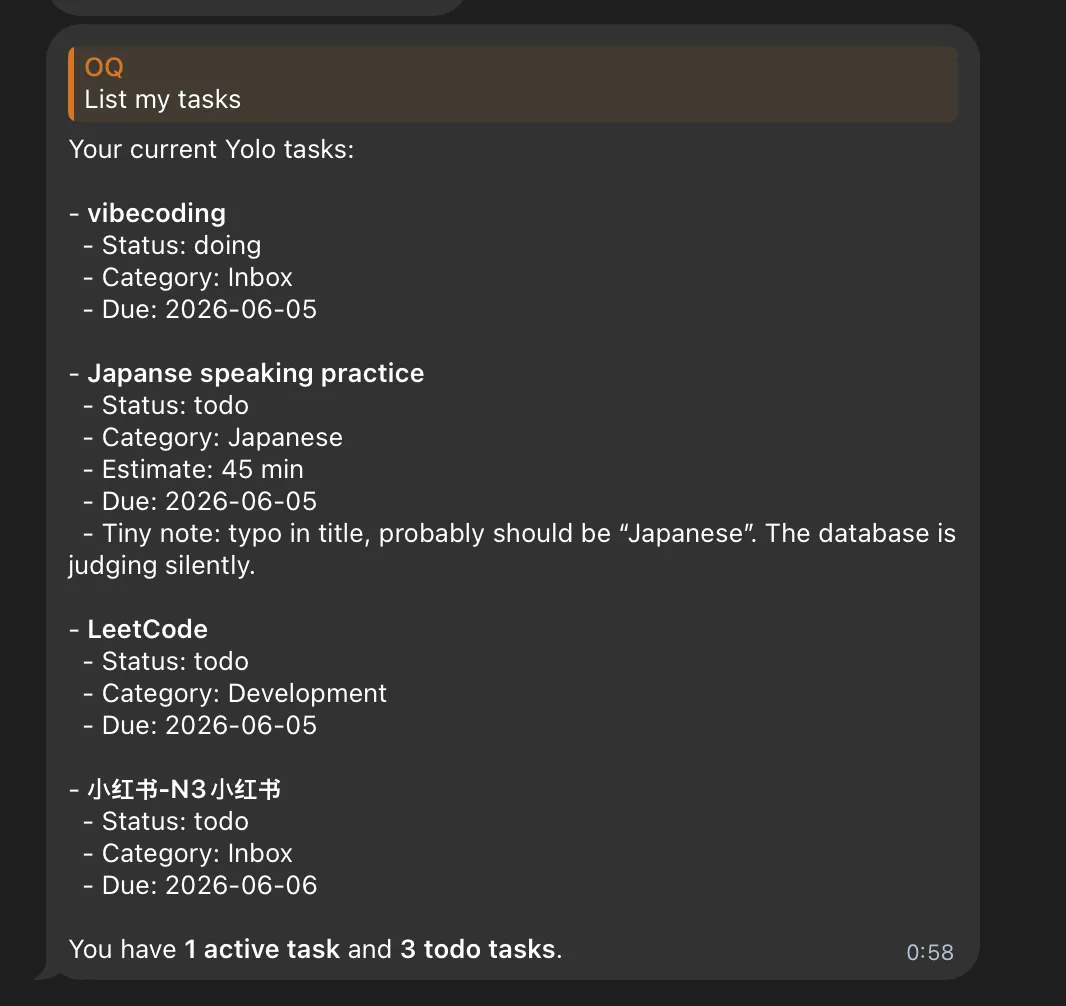
Simplest example — I can now just ask:
List my tasks
And Hermes reads Yolo’s today tasks via MCP: what I’m currently doing, what’s still todo, which category each belongs to, estimated time.
It’s not a flashy feature. But it’s the foundation for AI-native.
AI shouldn’t rely on my memory. It shouldn’t depend on me copy-pasting context every time. Within the permissions I grant it, it should be able to read real data directly — and then help me summarize, remind, plan, and calibrate based on that data.
Today’s MCP integration is step one in that direction.
For now, it’s read-only. It can see but not touch.
Once the read side stabilizes, the next step is more careful write capabilities: creating tasks, adding notes, generating tomorrow’s plan, or — with confirmation — starting or stopping a task on my behalf.
So today’s progress boils down to one sentence:
Yolo isn’t just my personal time ledger anymore. AI can finally read it.